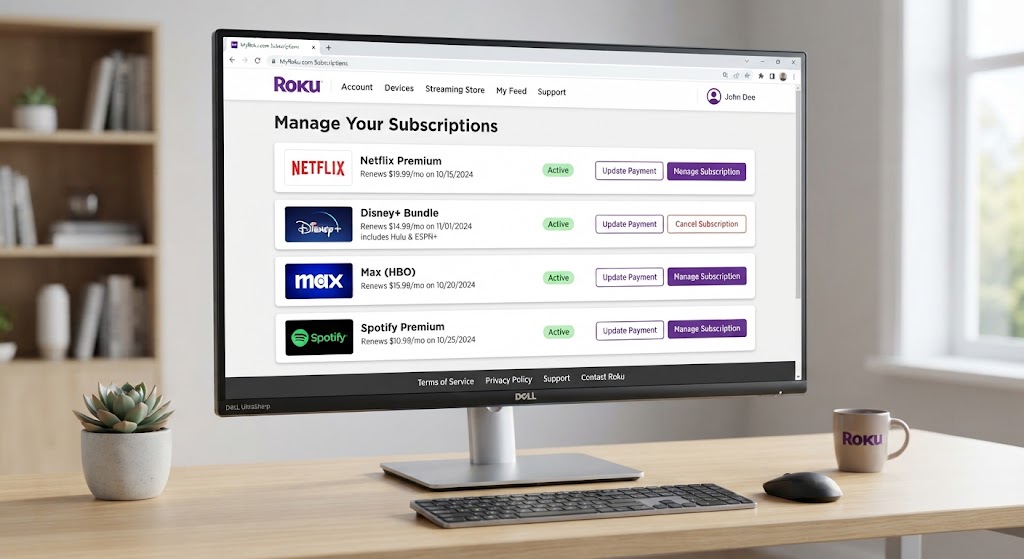
Searching for myRoku.com subscriptions usually means users want to check their Roku subscription status, manage streaming services, cancel unwanted plans, or understand unexpected Roku charges. Roku provides a centralized account system where customers can manage many subscriptions connected to their Roku account, including premium streaming channels and services purchased through Roku. Roku
Many people confuse having a Roku device with having a Roku subscription. A Roku TV, Roku Stick, or Roku player does not automatically require a monthly fee. Instead, charges usually come from optional premium channels, streaming services, trials that converted into paid plans, or subscriptions purchased through Roku Pay. Roku
This guide explains how myRoku.com subscriptions work, how to view active plans, cancel recurring payments, identify unknown charges, and get more control over your streaming expenses.
What Are MyRoku.com Subscriptions?
MyRoku.com subscriptions refer to the streaming subscriptions linked to your Roku account dashboard. Through your Roku account, you can view and manage eligible subscriptions that were purchased through Roku.
Roku acts as a payment and account management platform for many streaming channels. Instead of creating separate accounts for every service, some users choose to subscribe through Roku and manage everything from one place. Roku
Examples of subscriptions that may appear include:
- Premium channels on The Roku Channel
- Movie and entertainment services
- Live TV streaming packages
- Specialty streaming channels
- Roku Smart Home subscriptions
- Promotional free trials converted into paid memberships
However, not every streaming service connected to your Roku device is controlled by Roku. Some subscriptions must be managed directly through the service provider. Roku
How to Access MyRoku.com Subscriptions
To check your current subscriptions, you need to sign in to your Roku account.
Follow these steps:
- Open your Roku account page.
- Sign in using the email connected to your Roku device.
- Navigate to your subscription management section.
- Review your active subscriptions.
- Select any subscription to view billing details or cancellation options.
Your subscription page shows services that are billed through Roku. If a subscription does not appear there, it may have been purchased directly from another company. Roku
How Do MyRoku.com Subscriptions Work?
Understanding Roku billing can prevent unexpected charges.
There are generally three subscription situations:
1. Subscriptions Managed and Billed Through Roku
This is the simplest type.
You:
- Subscribe through your Roku account
- Pay through Roku Pay
- Manage cancellation through Roku
For these subscriptions, you can usually turn off automatic renewal from your Roku account dashboard. Roku
2. Subscriptions Billed Through Roku but Managed by Another Service
Some popular streaming companies use Roku billing but still control subscription management themselves.
Examples may include:
- Disney+
- Hulu
- Netflix
- Other third-party streaming providers
In these cases, Roku may process payment, but cancellation or plan changes must happen through the provider. Roku
3. Subscriptions Purchased Directly From Streaming Companies
If you subscribed through:
- A streaming website
- A mobile app
- Another platform
Your Roku account may only be used for watching the service.
Billing and cancellation happen outside Roku.
How to Cancel MyRoku.com Subscriptions
Many users search myRoku.com subscriptions cancel because they want to stop recurring payments.
The cancellation process depends on where the subscription was purchased.
Cancel a Roku-Billed Subscription Online
Steps:
- Sign in to your Roku account.
- Open subscription management.
- Find the active subscription.
- Select Manage Subscription.
- Choose Turn Off Auto-Renew.
- Confirm cancellation.
After cancellation, you can normally continue using the service until the current billing period ends. Roku
Cancel Roku Subscription From Your Roku Device
You can also manage some subscriptions directly from your Roku TV or streaming device.
Steps:
- Press the Home button on your Roku remote.
- Highlight the channel.
- Press the Star (*) button.
- Select Manage Subscription.
- Choose cancellation options.
If you do not see the subscription management option, the subscription may not be controlled by Roku. Roku
Why Am I Being Charged by Roku?
Unexpected charges are one of the biggest reasons people search for myRoku.com subscriptions.
Common causes include:
Free Trial Converted Into Paid Subscription
Many streaming services offer:
- 7-day trials
- 14-day trials
- 30-day trials
If you forget to cancel before the trial ends, automatic billing may begin.
Roku recommends checking your purchase history and subscription list to identify these charges. Roku
Someone Else Used Your Roku Account
A family member or another person with access to your Roku account may have:
- Added a subscription
- Purchased a channel
- Started a free trial
To prevent accidental purchases, enable a Roku PIN.
Multiple Roku Devices Using One Account
If you have multiple Roku devices, your subscriptions may appear across devices because they are connected to the same Roku account.
You do not need separate subscriptions for every Roku device. Roku
How to Check Roku Subscription Charges and Payment History
If you notice an unfamiliar payment:
- Sign in to your Roku account.
- Open purchase history.
- Review invoices and transactions.
- Match charges with your subscriptions.
Roku charges may appear under names such as:
- Roku
- Roku for [service name]
- The Roku Channel Roku
Checking your payment history is the fastest way to understand where your money is going.
How to Change or Upgrade Roku Subscription Plans
Some Roku-managed subscriptions allow users to upgrade or downgrade their plans.
You may be able to:
- Switch from basic to premium
- Change package options
- Modify subscription tiers
The process usually involves:
- Opening your subscription dashboard.
- Selecting the subscription.
- Choosing available plan options.
- Confirming the change.
Availability depends on the specific streaming service. Roku
Common MyRoku.com Subscription Problems and Solutions
Problem 1: Subscription Not Showing
Possible reasons:
- You logged into the wrong Roku account
- The subscription was purchased directly from another provider
- The payment belongs to another email address
Solution:
Verify the email connected to your Roku device and check your provider account.
Problem 2: Roku Keeps Charging After Cancellation
If charges continue:
- Confirm cancellation was completed
- Check the cancellation date
- Review your billing cycle
- Contact Roku support if the issue continues
Turning off auto-renew prevents future renewal charges, but access normally continues until the paid period expires. Roku
Problem 3: Cannot Remove Payment Method
Roku may require cancellation of active subscriptions before removing stored payment details.
Check your active plans first.
How to Protect Your Roku Account
Streaming accounts contain payment information, so security matters.
Recommended steps:
- Use a strong unique password
- Enable account security features
- Create a Roku purchase PIN
- Review subscriptions regularly
- Avoid sharing account credentials publicly
A few minutes of account maintenance can prevent unwanted charges.
Are Roku Subscriptions Worth It?
The value depends on your viewing habits.
Roku subscriptions can be useful if you want:
- Multiple streaming services in one place
- Easier billing management
- Faster access to premium channels
- Simplified entertainment control
They may not be ideal if:
- You rarely watch paid content
- You already subscribe directly through providers
- You want to minimize monthly expenses
Before subscribing, compare the price, content library, and cancellation terms.
Frequently Asked Questions About MyRoku.com Subscriptions
1. What is myRoku.com subscriptions used for?
MyRoku.com subscriptions allows Roku users to view and manage subscriptions connected to their Roku account. It helps users check active plans, manage billing, and cancel eligible subscriptions. Roku
2. How do I cancel a subscription through myRoku.com?
Sign into your Roku account, open subscription management, select the subscription, choose “Manage Subscription,” and turn off auto-renewal. Your access usually continues until the current billing period ends. Roku
3. Why does Roku keep charging my card?
Roku charges usually happen because of active subscriptions, expired free trials, or purchases made through your account. Checking your Roku purchase history can help identify the source. Roku
4. Does Roku have a monthly subscription fee?
No. Owning a Roku device does not require a monthly subscription fee. Users only pay for optional premium streaming services or channels they choose to subscribe to.
5. Can I manage Netflix or Disney+ through my Roku account?
It depends on how you subscribed. Some services billed through Roku require management through the streaming provider itself rather than Roku. Roku
Final Thoughts: Take Control of Your MyRoku.com Subscriptions
Managing myRoku.com subscriptions does not have to be complicated. The key is understanding which services are billed through Roku, which ones belong to third-party providers, and how automatic renewals work.
Regularly reviewing your subscription dashboard helps prevent unwanted charges and keeps your streaming budget under control.
If you notice unfamiliar payments, check your Roku purchase history first, confirm your active subscriptions, and cancel anything you no longer use. A well-managed Roku account gives you more entertainment freedom without unnecessary expenses.